30-day free trial — no credit card to install Join 500+ users

Skip the fluff.
Find the moment.
Ask AI.

SkipVid auto-skips intros & sponsors, searches transcripts by keyword or concept, and lets you ask AI questions about any YouTube video.

Free: keyword search + auto-skip • Trial unlocks all features for 30 days

Available on the Chrome Web Store
Creators
Students
Researchers
Engineers
Editors
Teams
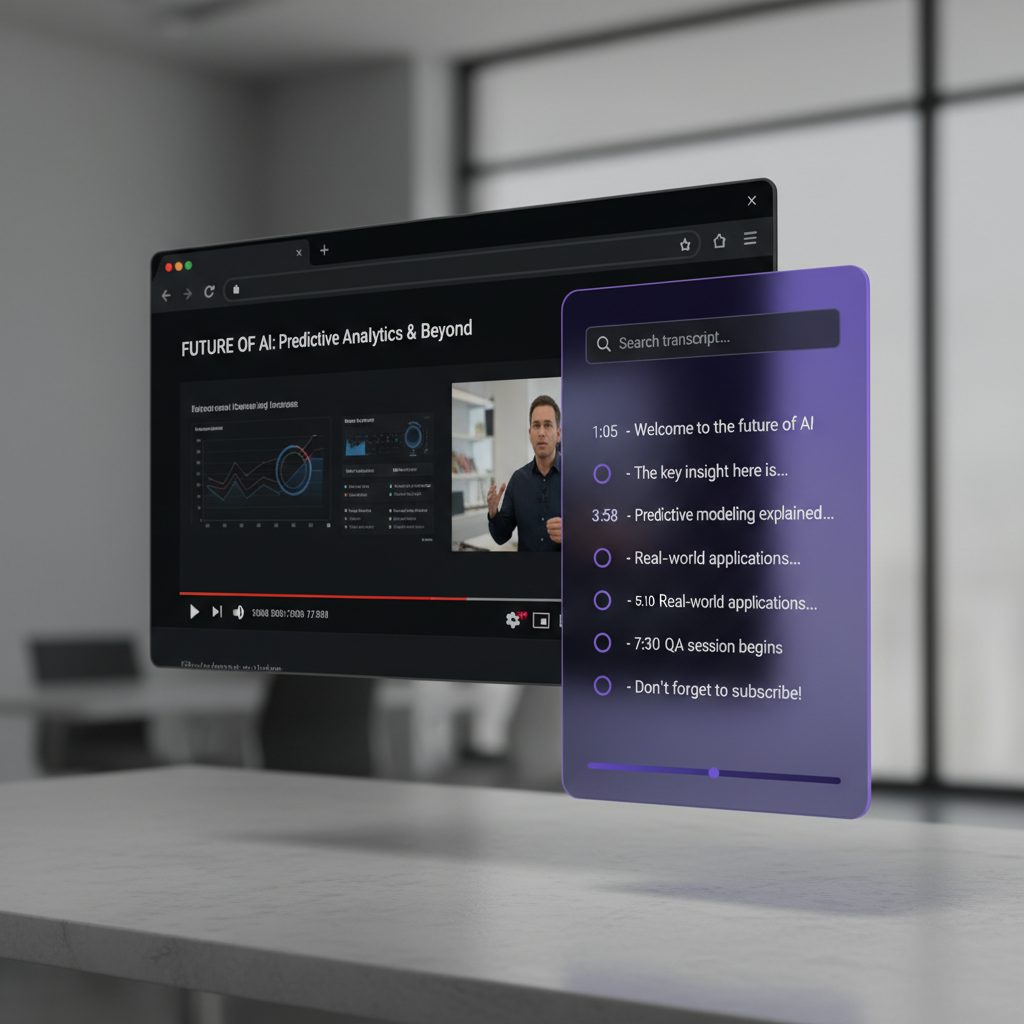
SkipVid Chrome extension showing the transcript search panel alongside a YouTube video, with auto-skip controls visible

What SkipVid does

Built for power viewers
Free

Skip intros & sponsors

  • Auto-skip intros and sponsored segments
  • ML-powered intro detection + SponsorBlock data
  • Toggle auto-skip on/off per video
  • Keyword search & jump to timestamps
Regular

Concept search & Search-AI

  • Find topics even if the exact words aren't used
  • AI-powered smart timestamps
  • Great for tutorials, lectures, podcasts
Pro

Ask-AI (Q&A about any video)

  • Ask questions; get concise answers
  • Click citations to jump to the moment
  • Perfect for deep dives & research

How it works

3 steps
1

Add to Chrome

Install SkipVid from the Chrome Web Store. Free forever for basic features.

2

Open a YouTube video

The SkipVid panel appears on /watch and /shorts pages. Intros & sponsors are auto-skipped.

3

Search, skip, ask

Search by keyword (free), concept (Regular), or ask AI questions (Pro).

Loved by early users

"I skim hours of lecture videos in minutes. The AI jump-to is witchcraft."

— Alex P., CS student

"The auto-skip alone saves me 10 minutes per video. Concept search is the cherry on top."

— Maya R., Video editor

"I ask questions, it finds the clip. That workflow pays for itself in a day."

— Dan S., Researcher

Pricing

Start free, upgrade when you're ready

Free

$0

Free forever

  • Keyword search & jump to timestamps
  • Auto-skip intros & sponsors
  • Fetch & copy transcripts
Add to Chrome

Pro

$10/mo
30-day free trial
  • Everything in Regular
  • Ask-AI (Q&A about any video)
  • Future Pro-only tools
Start Free Trial

All trials are 30 days, no charge until the trial ends. Cancel anytime. Checkout uses Stripe.

Feature comparison

Feature Free Regular ($5/mo) Pro ($10/mo)
Keyword search & jump-to
Auto-skip intros & sponsors
Fetch & copy transcripts
Concept search (spaCy NLP) Not included
Search-AI (LLM smart timestamps) Not included
Ask-AI (chat about any video) Not included Not included
30-day free trial Not included

FAQ

Quick answers
Does SkipVid work on every video?
Search and transcript features work wherever captions are available. Intro & sponsor skipping works on most videos using ML detection and SponsorBlock community data.
How does the free trial work?
When you subscribe to Regular or Pro, the first 30 days are completely free. You won't be charged until the trial ends, and you can cancel anytime.
What's the difference between Free, Regular, and Pro?
Free gives you keyword search, transcript access, and auto-skip. Regular ($5/mo) adds concept search and Search-AI. Pro ($10/mo) adds Ask-AI for chatting with any video.
How does auto-skip work?
SkipVid uses a machine-learning model to detect intros and combines it with SponsorBlock's crowd-sourced data for sponsors. You can toggle auto-skip on or off per video.
Can I use SkipVid at work or school?
Yes. We don't require Google sign-in. Admins can deploy the extension and distribute license tokens.
What about privacy?
We only process transcripts you request. See our Privacy Policy for details.
Refunds?
If SkipVid doesn't work for your use-case, contact us and we'll make it right.

Contact

We usually reply within 1–2 business days

You can also reach us at

support@skipvid.io